
“Discover how Repurpose.io helps video & podcast creators turn one piece of content into dozens of posts, save hours each week and grow across platforms. Features, pricing, pros-&-cons, and real user results.”
What is Repurpose.io?
Repurpose.io is a content-repurposing and automation platform designed to help creators and marketers take an existing piece of content (video, audio, live stream, etc.) and reuse it across multiple platforms with minimal manual effort. SaaSGenius+2FirstSiteGuide+2
Key capabilities include:
- Connecting source platforms (YouTube, TikTok, Zoom, podcasts, etc) and destination platforms (Instagram, Facebook, YouTube Shorts, Pinterest, etc) to automatically republish content in new formats. FirstSiteGuide+1
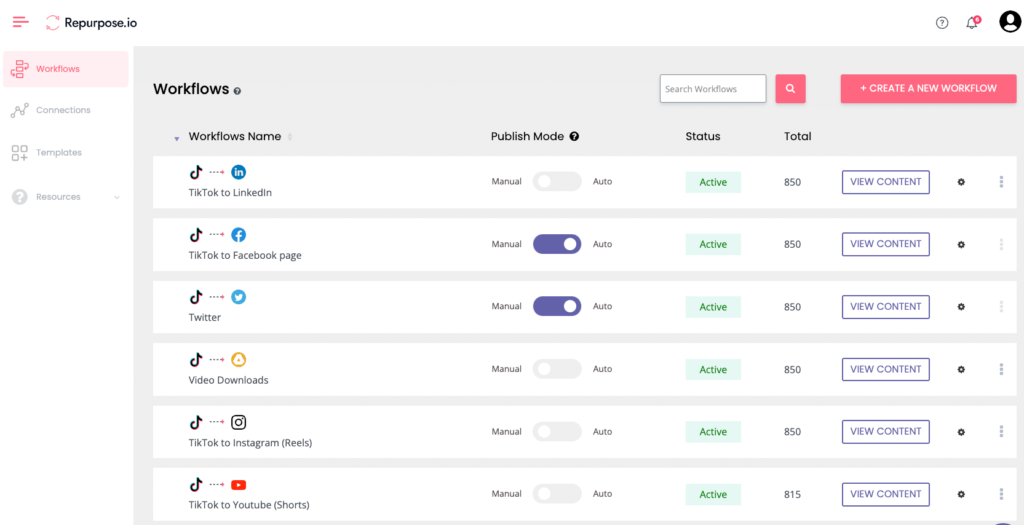
- Creating “workflows” where content from a source is transformed (resized, re-formatted, captioned) and published to one or more destinations. Heather Farris+1
- Features like watermark removal (especially useful for TikTok→Instagram workflows), backup of content (e.g., to Google Drive/Dropbox), scheduling, and multi-format output. SaaSGenius+1
In short: if you’re creating content and want to multiply its reach (across platforms) rather than always starting from scratch, Repurpose.io aims to make that easier.
Who is it for?
From the evidence and user stories, Repurpose.io is best suited for:
- Creators who already have a base of content — e.g., videos, podcasts, live streams — and want to expand reach. HerCozyCrew+1
- Marketers or small business owners who want to automate repetitive posting across platforms and save time.
- People who aim to scale social media or video-content output without hiring a large team or doing entirely manual duplications.
It is less ideal for:
- Someone who has almost no content yet — because the value comes from repurposing existing material.
- Those whose budget is extremely tight and who don’t yet see the workflow benefit (given that the paid plans are involved).
- Platforms where native posting has unique algorithmic benefits and the automation might reduce “native” engagement (see caveats below).
Key Features & Benefits
Here are some of the standout features and why they matter:
- Workflows & automation: Once you set up a workflow (e.g., YouTube → Instagram Reels → Pinterest video pin), the tool handles the conversion, formatting, resizing, etc. This means you spend significantly less time manually republishing. Heather Farris+1
- Multi-platform support: It supports a wide range of sources and destinations (YouTube, TikTok, Instagram, podcasts, Zoom, Google Drive, etc). polyinnovator.space+1
- Time savings: Users report being able to “batch” tasks and free up hours of work each week. For example: “It helped me save at least 5 hours a week” — from a user review. HerCozyCrew+1
- Backup & reuse: Content is not only republished but can be backed up or stored, and repurposed in various forms. FirstSiteGuide
- Ease of use / user interface: Reviews indicate that the UI is fairly intuitive and onboarding is smooth. Heather Farris+1
Weaknesses & Things to Watch
No tool is perfect. Here are the common drawbacks and caveats for Repurpose.io:
- Cost: While there is a free trial, full features require a paid plan. Some reviewers feel the cost is steep if you’re not using many workflows or publishing lots of content. polyinnovator.space+1
- Native algorithm concerns: Some creators worry that automated cross-posting could hurt reach (because platforms favour native uploads). One Reddit thread: “No it won’t hurt your reach… your content is the biggest factor.” Reddit
So while many say reach isn’t impacted, you still need to monitor performance platform by platform. - Features missing / limitations:
- Some platforms don’t allow full customization of description length or metadata when posting via Repurpose. Heather Farris+1
- Analytics is limited: reps say you’ll still have to use each platform’s native analytics; the tool is more distribution than analytics hub. FirstSiteGuide
- For creators with a small content load, the full automation value may not yet justify the cost. Some workflows may feel under-utilised. polyinnovator.space
Pricing & Value Proposition
Here’s a summary (based on available data, subject to change):
- Free trial: Some plans allow publishing up to a certain number of videos (e.g., 10) for free. Repurpose.io+1
- Paid plans: For example, one review says: “Content Marketer plan – ~$25/month” (for small creators) and “Agency plan – ~$125/month” (for multi-brand/teams) according to a 2023–24 review. Welcome
- In the SaaSGenius review: ~$12.42/month starting price mentioned (though might reflect promotion) for basic capability. SaaSGenius
- The value depends on your usage: If you’re actively repurposing content, the automation could save many hours and extend reach, making the cost worthwhile. If you’re producing little content, you might not yet see full ROI.
Real-World Results & User Feedback
Some examples of how this tool has impacted users:
- One creator claimed that after using Repurpose.io they saw a jump in Facebook earnings (from ~$3/month to ~$130-150/month within two months) due to improved consistency and repurposing. HerCozyCrew
- Reddit users: “I’ve had a great experience… I’ve had several videos get huge numbers after being cross-posted using Repurpose.io.” Reddit
On the flip side, some reviews on Trustpilot mention issues like customer service or concerns around video quality when auto-publishing. Trustpilot
These highlight that many users see notable growth when they use it consistently and at scale. But results vary based on content quality, platform strategy, and how much you leverage the tool.
Your blog context, you could present it as: “If you’re a creator producing video/podcast content and want to multiply your impact across platforms, here’s how Repurpose.io can help you.” You might also offer alternative tools (free or lower cost) for people at earlier stages who may not yet need full automation.
Should You Use It? My Verdict
Yes – if you:
- Already have content (videos/podcasts) you want to push across multiple platforms.
- Are committed to growing your social presence, repurposing content 🔁 rather than creating everything from scratch.
- Want to save time and scale with automation.
Maybe wait or look at alternatives if you:
- Are just starting out and produce little content — the price may outweigh the current benefit.
- Rely heavily on platforms where native posting is key (and automation might reduce performance) and you want to test reach manually first.
- Don’t have workflows set up yet; you’d need to spend time initially configuring and optimizing workflows for it to pay off.
DailyDashTools has Free Tools for Content Creators